
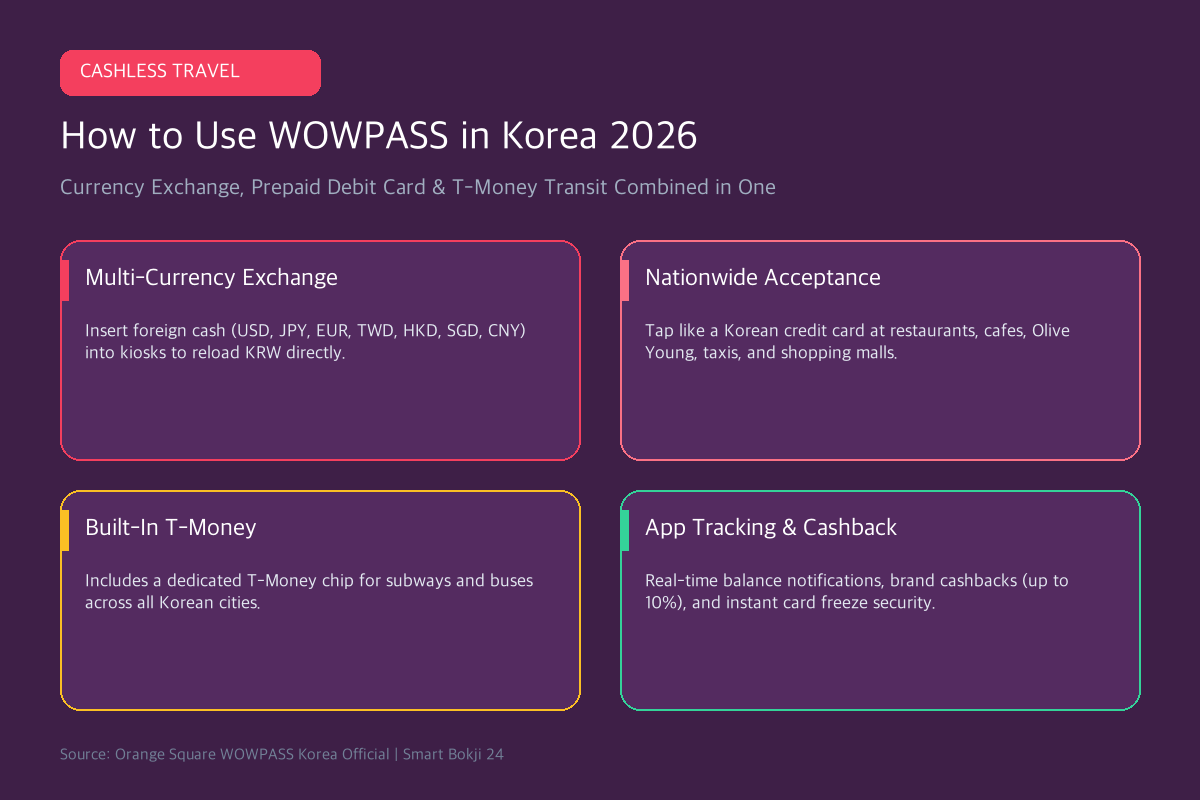
Welcome to the ultimate WOWPASS Korea card guide for 2026! South Korea has rapidly evolved into a cashless society, making this all-in-one card essential for visitors. reveals the ultimate all-in-one payment tool: a multi-currency prepaid debit card, automated currency exchange machine, and T-Money transit pass combined into a single chip card.
Instead of carrying bulky wads of paper Korean Won or paying hefty 3% foreign transaction fees on your home country credit cards, WOWPASS lets you insert your native currency (USD, JPY, EUR, TWD, HKD, SGD, etc.) into automated kiosks to reload a Korean Won debit card at near-market exchange rates. In this 2026 guide, we explain everything you need to know about setting up and maximizing your WOWPASS card.
1. WOWPASS Korea Card Guide: 4 Standout Advantages
WOWPASS (developed by Orange Square) is custom-designed specifically to solve the biggest pain points experienced by foreign travelers in South Korea:
💳 4 Standout Features of WOWPASS
- Multi-Currency Cash Exchange: Accepts 16 major global currencies directly into automated kiosks across Incheon Airport, Seoul Metro stations, and major hotels.
- 100% Nationwide Merchant Acceptance: Recognized by Korean card readers as a domestic local IC credit card. Works everywhere from Olive Young and department stores to street kiosks.
- Built-In T-Money Transportation Chip: Tap seamlessly on subways, city buses, and taxis across all Korean cities (Seoul, Busan, Jeju, Gyeongju).
- Real-Time Mobile App & Cashback Perks: Receive instant push notifications on spending, monitor remaining balance, and enjoy exclusive 5%~10% cashbacks at partner retailers (Olive Young, Starbucks, CU).
- Official Source: Incheon International Airport Terminal Guide.
- Official Source: Korea Tourism Organization VisitKorea.
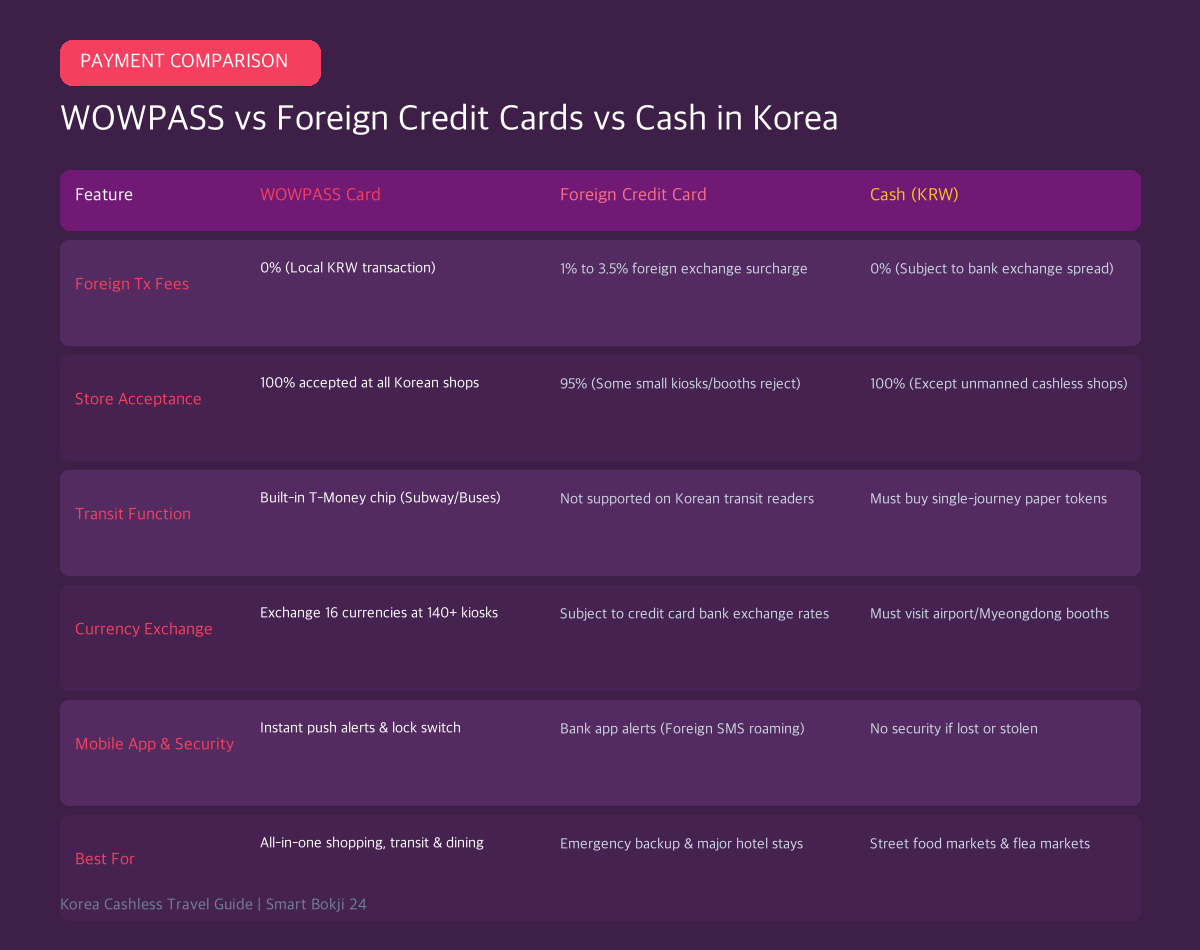
2. WOWPASS vs Foreign Credit Cards vs Cash
Here is how WOWPASS compares head-to-head against using your standard home credit cards or carrying cash:
3. Step-by-Step: How to Get and Activate WOWPASS
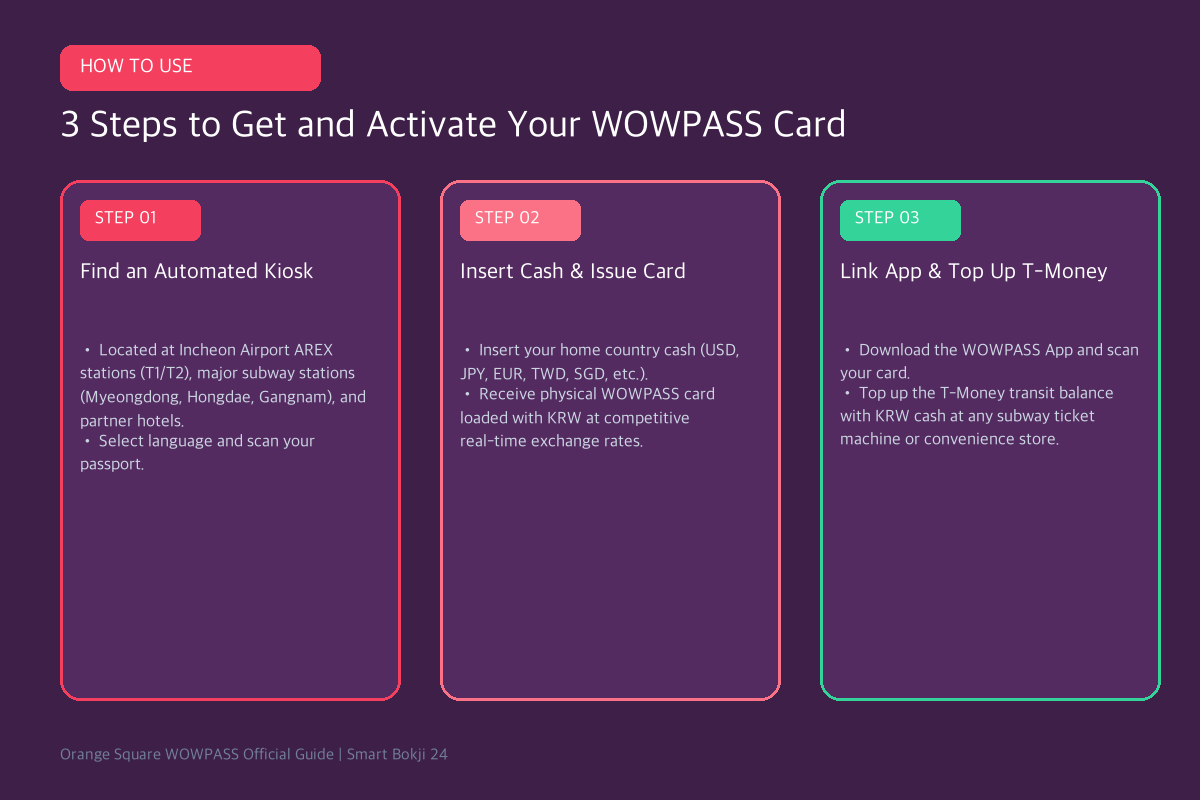
- Step 1: Find an Automated Kiosk: Locate an orange WOWPASS kiosk at Incheon Airport AREX Express stations (T1 & T2), Gimpo Airport, major Seoul subway hubs (Myeongdong, Hongdae, Gangnam, Dongdaemun), or partner hotels (Lotte Hotel, Novotel).
- Step 2: Scan Passport & Insert Foreign Cash: Select your preferred language, scan your physical passport, pay the 5,000 KRW membership fee, and insert paper cash (USD, JPY, EUR, etc.). The machine dispenses your activated physical WOWPASS card loaded with Korean Won.
- Step 3: Link the WOWPASS App & Top Up T-Money: Download the WOWPASS mobile app (iOS/Android) and scan the barcode on your card. Important: The shopping debit balance and T-Money transit balance are separate chips on the same card. Top up the T-Money balance with KRW cash at any subway ticket kiosk or convenience store (CU, GS25, 7-Eleven).
5. Frequently Asked Questions (FAQ)
Q1: Can I withdraw remaining cash from my WOWPASS before leaving Korea?
Yes. You can withdraw remaining KRW cash balance from any WOWPASS kiosk for a small fee of 1,000 KRW per transaction.
Q2: What happens if I lose my physical WOWPASS card?
Open your WOWPASS mobile app and instantly toggle the ‘Pause Card’ switch to freeze all spending. You can reissue a replacement card at any kiosk and immediately recover your remaining funds.
🔗 Essential Korea Travel & Shopping Guides
- Compare transit options: Check our Korea Climate Card vs T-Money 2026 Transit Guide.
- Get up to 10% VAT back: Read our Complete Korea Tax Refund Guide 2026.
- Stay connected on 5G: Explore our Best Korea eSIM & SIM Card Guide for Travelers.
- Official Source: Incheon International Airport Terminal Guide.
- Official Source: Korea Tourism Organization VisitKorea.
Separate the three functions
WOWPASS combines a prepaid payment balance, foreign-currency top-up features, and a transportation-card function, but the balances and refund rules are not identical. Loading money for shops does not necessarily load the transport balance. Check each balance before entering the subway and keep another payment method for merchants or services that do not accept prepaid cards.
Before adding a large balance
Review the current exchange rate, top-up fee, withdrawal or refund rule, and machine location in the official app. Estimate daily spending and add funds in stages instead of treating the card like a bank account. Do not share the card number, verification code, or passport images with unofficial support accounts.